Photos and location
EXIF can describe cameras, capture settings and dates. GPS metadata can reveal where a photograph was taken. The inspector helps locate these fields before publication.
Portfolio
MetaClean helps users inspect the extra information stored in files before sharing them. The desktop interface presents metadata in images, video and documents, including EXIF, GPS location and XMP fields. Users can review detected fields and select information for removal. Built with Rust and Tauri, it brings inspection and cleaning into one workspace.
Files may contain information that is not apparent when viewing them, such as photo location, authorship, dates or device details. Users need a clear way to inspect these fields and choose what to remove before sharing.
MetaClean combines a file list, categorized metadata inspector and cleaning controls. EXIF, GPS and XMP categories make information easier to find, while field selection tailors removal to the sharing context. Rust handles processing logic and Tauri provides the desktop application foundation.
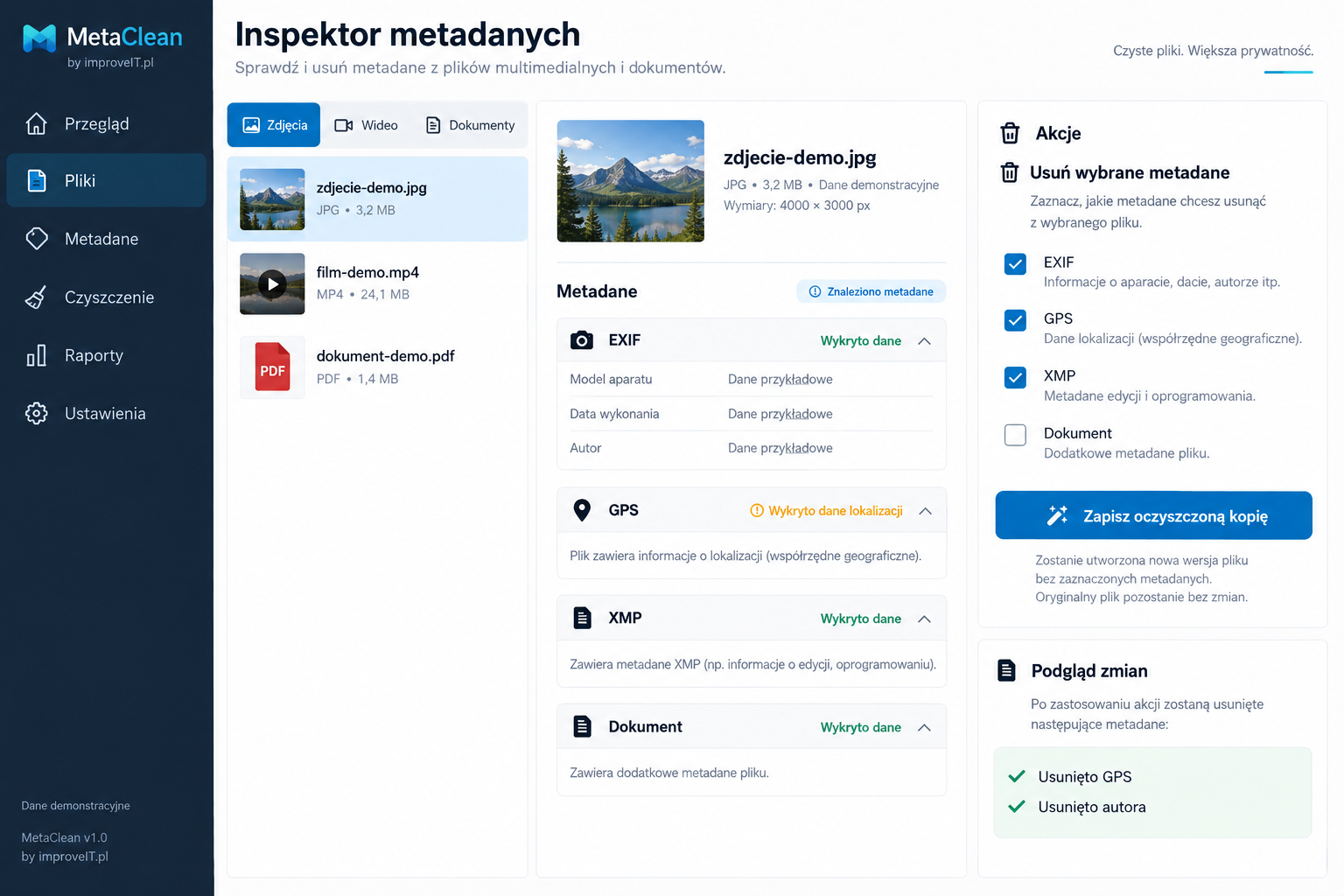
Review extra information stored in files and decide which fields should remain.
EXIF can describe cameras, capture settings and dates. GPS metadata can reveal where a photograph was taken. The inspector helps locate these fields before publication.
Depending on the format, files may contain authors, dates, descriptions and software information. Inspection and removal depend on supported formats; fields differ between files.
Choose categories to remove information that is unnecessary for sharing. Removing metadata does not remove information visible in the image, document content or recording itself.